
If you need email to route via Office 365 instead of our StackMail platform, you can use our one-click record addition tool from within Manage DNS.
To use this tool:
- Head to Manage Hosting and select Manage on the hosting package
- Select Manage DNS within the package

- Select Office 365 Mail from the dropdown box under Preconfigured Settings. This will add the correct records for Office 365 Mail automatically.
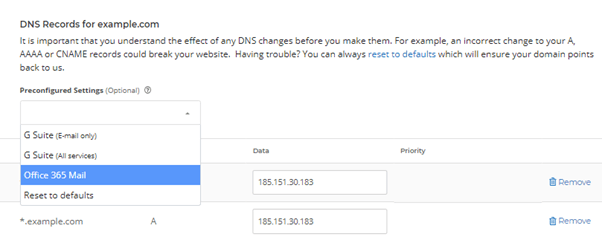
- Save by selecting Update DNS
Usually it can take about 30 minutes for DNS changes to propagate. However, it can take a little longer for changes to update across various DNS systems.