
Every database or site administrator needs to do database maintenance regularly. The ability to retrieve queries much more quickly is what makes a responsive website different from one that seems slow; this is all thanks to an efficient and well-managed database.
Magento
Sometimes, there’s no clear cause for why Magento databases can grow in size! The most common source of this is the installation’s log data, which may not be being automatically deleted. Reducing the size of a database significantly is a usual result of cleansing log data.
1) To prune log data within Magento, you’ll need to log in to the Magento Admin facility.
2) Then select System > Configuration.
3) Under Advanced, select System.
4) Under Log, select Yes under Enable Log Cleaning.
5) Set the frequency for which you would like log data retaining for under Save Log, Days.
As is common practice, we advise most users to just save log data for no more than one week.
After this configuration is made, Magento will only save log data for the specified duration. Reducing the number of days can be necessary if you discover that your database is still bigger than desired.
WordPress
A WordPress database has the potential to grow too large with time.
There are several things that can accumulate excessive space during a WordPress installation, including deactivated plugins and themes. By eliminating them, WordPress can access the database and its tables at a far faster rate, which in turn improves response times. Neither huge nor messy datasets, nor data that is no longer needed, will be obstacles for it to overcome.
phpMyAdmin can be used to sort database tables by size (by selecting the Size column):
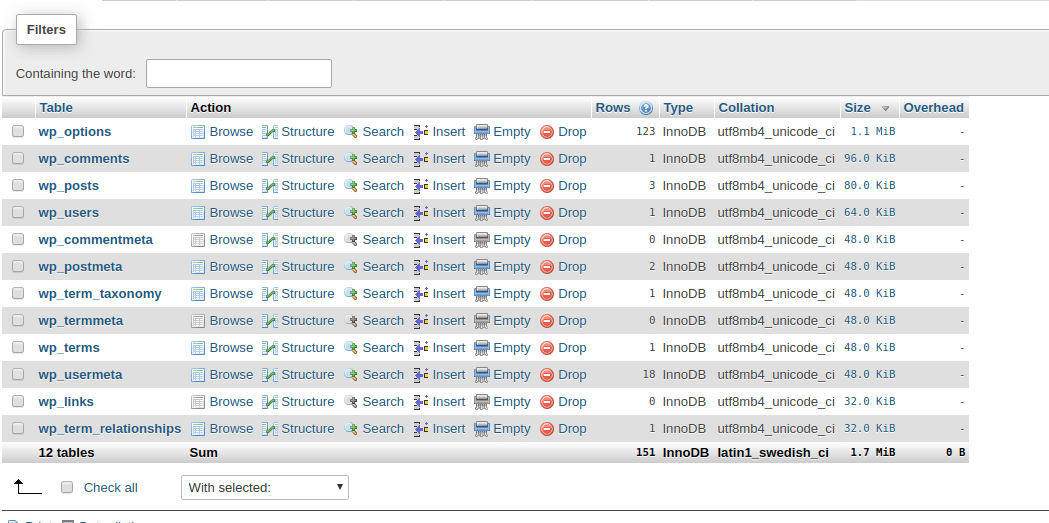
In doing so, you can identify the largest tables in your WordPress installation and decide whether to remove, maintain, or shrink them.
Plugins: For instance, since they are no longer needed, we can search for tables that pertain to plugins that have been deactivated and delete them. Large tables may still be present in certain deactivated plugins. This is to ensure that all data and tables in the database may be accessed in the event that you decide to reactivate the plugin or theme.
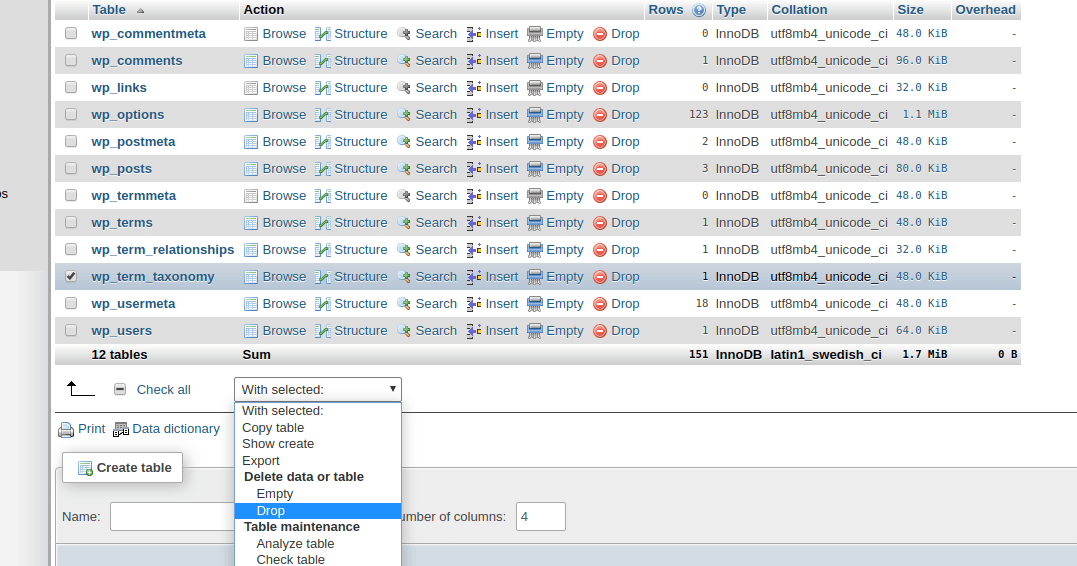
You can remove a table within phpMyAdmin by using the DROP TABLE function from the available drop-down:
Unassociated tags: Occasionally, you could find that you have a bunch of tags that don’t actually go with any posts. These tags might be lurking in the database even after you’ve deleted a tonne of posts and articles. You can remove these orphan tags with these queries:
DELETE FROM wp_terms WHERE term_id IN (SELECT term_id FROM wp_term_taxonomy WHERE count = 0 );
DELETE FROM wp_term_taxonomy WHERE term_id not IN (SELECT term_id FROM wp_terms);
DELETE FROM wp_term_relationships WHERE term_taxonomy_id not IN (SELECT term_taxonomy_id FROM wp_term_taxonomy);
Autosaves: The built-in autosave feature of WordPress will automatically save any new posts or articles you create to your database. These autosaves might grow to be rather huge, depending on your writing. Consequently, you can significantly decrease the size of the database by deleting these autosaves if they are no longer needed. The following query can be used to remove autosaves:
DELETE FROM wp_posts WHERE post_type = “revision” AND post_name LIKE “%autosave%”
Trash days: Reducing the frequency with which WordPress automatically deletes trash is another helpful approach. This can be achieved by defining EMPTY_TRASH_DAYS within your wp-config.php file as follows:
define(‘EMPTY_TRASH_DAYS’, 7);
In days, the end number tells you how often you want this to happen. In this case, the trash would be thrown away every seven days.
Transients: Transients offer a means to store cached data within a database temporarily (thus their name). Whilst this can be useful for reducing the amount of queries a site makes, you may often find that WordPress hasn’t removed transients that have expired; transients having specific expiration dates. Consequently, this can cause the database to become bloated.
Expired transients can be removed by performing the following query:
DELETE FROM wp_options WHERE option_name LIKE (‘%\_transient\_%’)